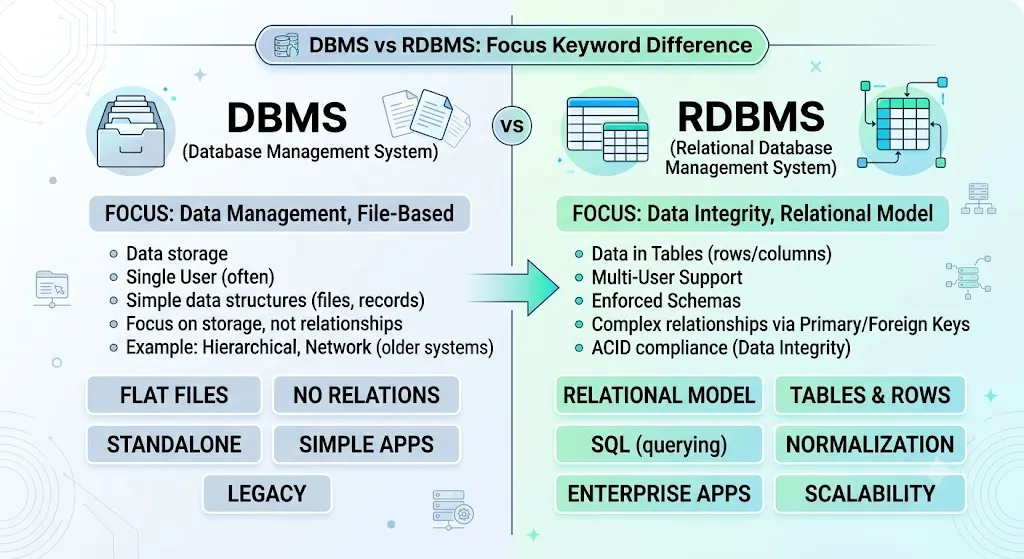
In today’s digital world, data is everywhere. Imagine a small shop owner who keeps customer records in a simple file system. As the business grows, he shifts to a more structured system where customer data is linked with orders and payments. This transition reflects the difference between DBMS and RDBMS. A DBMS (Database Management System) is a system that stores and manages data, while an RDBMS (Relational Database Management System) organizes data into related tables.
Understanding the difference between DBMS and RDBMS helps both beginners and professionals manage data efficiently. In real-world applications, knowing the difference between DBMS and RDBMS ensures better decision-making in software development. Whether you are a student or an expert, the difference between DBMS and RDBMS plays a vital role in handling structured and unstructured data.
Key Difference Between the Both
The main difference is that DBMS stores data as files, while RDBMS stores data in tables with relationships between them.
Why Is Their Difference Necessary to Know?
Knowing the difference between DBMS and RDBMS is important because it helps learners choose the right system for projects. Experts use this knowledge to design efficient, secure, and scalable systems. In society, these systems power banks, schools, hospitals, and online platforms. Without understanding their differences, data misuse, inefficiency, and security risks may arise.
Pronunciation
- DBMS (US & UK): /ˌdiː.biː.emˈes/
- RDBMS (US & UK): /ˌɑːr.diː.biː.emˈes/
Now that we understand the basics, let’s explore their differences in detail.
Difference Between DBMS and RDBMS
1. Structure
- DBMS stores data in files.
Example 1: A text file storing student names.
Example 2: A simple inventory list. - RDBMS stores data in tables.
Example 1: A table for students and another for grades.
Example 2: Linked tables for customers and orders.
2. Relationship
- DBMS does not support relationships.
Example 1: Separate files for users and orders.
Example 2: No link between employee and salary data. - RDBMS supports relationships.
Example 1: Foreign keys link tables.
Example 2: Customer ID connects orders.
3. Data Redundancy
- DBMS has high redundancy.
Example 1: Same data stored in multiple files.
Example 2: Repeated customer details. - RDBMS reduces redundancy.
Example 1: Data stored once and referenced.
Example 2: Shared tables avoid duplication.
4. Security
- DBMS has low security.
Example 1: Limited access control.
Example 2: Weak user permissions. - RDBMS has high security.
Example 1: Role-based access.
Example 2: Authentication systems.
5. Normalization
- DBMS does not support normalization.
Example 1: Unorganized data.
Example 2: Mixed information in one file. - RDBMS supports normalization.
Example 1: Data split into logical tables.
Example 2: Reduced duplication.
6. Data Integrity
- DBMS has low integrity.
Example 1: Inconsistent data entries.
Example 2: Errors not easily detected. - RDBMS ensures high integrity.
Example 1: Constraints enforce rules.
Example 2: Accurate relationships.
7. Multi-user Access
- DBMS supports limited users.
Example 1: One user editing at a time.
Example 2: Conflicts occur easily. - RDBMS supports multiple users.
Example 1: Many users access data simultaneously.
Example 2: Transactions handled smoothly.
8. Complexity
- DBMS is simple.
Example 1: Easy file-based system.
Example 2: Suitable for small tasks. - RDBMS is complex.
Example 1: Requires knowledge of SQL.
Example 2: Used in large systems.
9. Scalability
- DBMS is less scalable.
Example 1: Not suitable for big data.
Example 2: Performance drops with growth. - RDBMS is highly scalable.
Example 1: Handles large databases.
Example 2: Used in enterprise systems.
10. Examples
- DBMS examples: file systems.
Example 1: Simple record systems.
Example 2: Old desktop databases. - RDBMS examples: MySQL, Oracle.
Example 1: Banking systems.
Example 2: E-commerce platforms.
Nature and Behaviour
- DBMS: Simple, less structured, and suitable for small-scale applications. It behaves like a basic storage system.
- RDBMS: Structured, rule-based, and ideal for complex systems. It behaves like an intelligent data manager.
Why People Are Confused About Their Use?
People often confuse DBMS and RDBMS because both manage data. The terms sound similar, and RDBMS is actually a type of DBMS. Beginners may not notice the relational aspect, which is the key difference.
Table: Difference and Similarity
| Feature | DBMS | RDBMS | Similarity |
| Structure | File-based | Table-based | Both store data |
| Relationships | Not supported | Supported | Manage data |
| Security | Low | High | Protect information |
| Redundancy | High | Low | Store records |
| Users | Limited | Multiple | Data access |
Which Is Better in What Situation?
DBMS:
DBMS is better for small applications where data is simple and does not require complex relationships. For example, a small shop or personal record system can use DBMS because it is easy to manage and does not require advanced skills.
RDBMS:
RDBMS is better for large systems like banks, schools, and online stores. It handles complex data relationships, ensures security, and supports multiple users. It is ideal when accuracy, scalability, and performance are important.
Metaphors and Similes
- DBMS is like a notebook where you write everything randomly.
- RDBMS is like a well-organized library with labeled sections.
Connotative Meaning
- DBMS: Neutral (simple and basic)
Example: “He used a DBMS for his small project.” - RDBMS: Positive (advanced and reliable)
Example: “The company relies on RDBMS for secure data handling.”
Idioms or Proverbs
(Not directly related, but adapted)
- “Keep things in order”
Example: RDBMS helps keep things in order. - “Too many cooks spoil the broth”
Example: Without RDBMS, too many users may spoil data.
Works in Literature
- Database System Concepts Academic, Abraham Silberschatz, 1986
- Fundamentals of Database Systems, Academic, Elmasri & Navathe, 1989
Movies Related to Data/Systems
- The Social Network – 2010, USA
- Hackers – 1995, USA
FAQs
1. What is the main difference between DBMS and RDBMS?
DBMS stores data in files, while RDBMS uses tables with relationships.
2. Is RDBMS a type of DBMS?
Yes, RDBMS is an advanced form of DBMS.
3. Which is more secure?
RDBMS is more secure due to better access control.
4. Can DBMS handle large data?
Not efficiently compared to RDBMS.
5. Why is RDBMS widely used?
Because it supports relationships, scalability, and multiple users.
How Both Are Useful for Surroundings
DBMS helps in small-scale data storage like personal records. RDBMS supports large systems like banking, education, and healthcare, improving efficiency in society.
Final Words
DBMS is simple and suitable for beginners, while RDBMS is powerful and designed for complex needs. Both serve important roles depending on the situation.
The distinction between a DBMS and an RDBMS underscores a fundamental rule in software architecture: use the right tool for the specific job. There is no one-size-fits-all solution when it comes to managing data, and a system is only as good as its alignment with your project’s goals.
The Balancing Act: Simplicity vs. Power
Choosing between these two systems requires balancing immediate simplicity against long-term operational complexity.
- The Case for DBMS (Simplicity): For beginners, individual developers, or localized systems, a standard DBMS is often the most efficient path forward. It eliminates unnecessary overhead, requires minimal setup, and keeps data access straightforward. It proves that not every application needs a massive, interconnected network of tables to function effectively.
- The Case for RDBMS (Power): For enterprise environments, multi-user platforms, and financial applications, an RDBMS is indispensable. The strict enforcement of schemas, data normalization, and ACID compliance ensures that data remains accurate and uncorrupted, even when thousands of users are reading and writing to the database simultaneously.
Looking Ahead
As the data landscape continues to expand with big data, cloud computing, and real-time analytics, understanding these foundational concepts becomes even more critical. While newer technologies like NoSQL and NewSQL databases have emerged to handle unstructured data at massive scales, their design philosophies are still heavily rooted in the core differences established by DBMS and RDBMS.
Ultimately, recognizing where a basic file-based system succeeds and where a robust relational model is required is what separates great system design from poor resource management. By mastering both, professionals can build data structures that are not only efficient today but are also built to endure tomorrow’s challenges.
Conclusion
Understanding the difference between DBMS and RDBMS is essential in today’s data-driven world. While DBMS provides a basic way to store and manage data, RDBMS offers a structured, secure, and scalable solution. The choice between them depends on the size, complexity, and requirements of the system. For learners, this knowledge builds a strong foundation, and for professionals, it ensures efficient system design. Ultimately, both systems contribute significantly to managing information in modern society.
The transition from a standard Database Management System (DBMS) to a Relational Database Management System (RDBMS) represents a fundamental shift from simple data storage to sophisticated data architecture. While a DBMS serves as the foundational blueprint for file-based indexing and localized management, it is the RDBMS that transforms raw information into an interconnected, enterprise-ready asset.
Ultimately, the choice between the two is not merely a matter of upgrading technology, but a strategic decision based on operational scale:
- DBMS remains highly effective for lightweight, single-user applications, configuration files, and legacy systems where the overhead of complex relations is unnecessary.
- RDBMS acts as the backbone for modern enterprise infrastructure, where multi-user concurrency, strict data integrity (ACID compliance), and complex transactional tracking are non-negotiable.
In the broader scope of modern technology, mastering these distinctions allows developers and architects to build systems that are both cost-effective and structurally sound. By aligning the specific constraints of a project with the appropriate database model, organizations ensure that their data infrastructure can support seamless scalability, robust security, and long-term operational efficiency.

I am a professional SEO content writer specialising in comparison-based and grammar-focused articles. Through my website GrammarCompare.com, I help readers clearly understand the difference between confusing terms with well-researched, easy-to-read content. My expertise lies in focusing on clarity, accuracy, and practical explanations that improve both knowledge and writing skills.