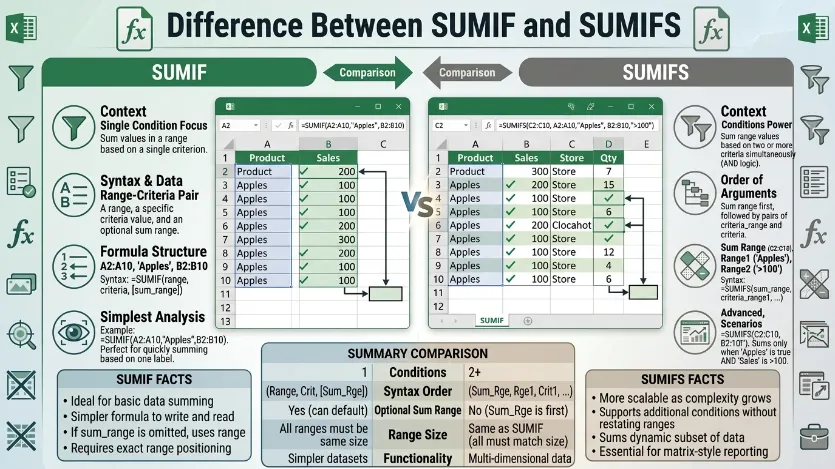
A small business owner was reviewing monthly sales data using Microsoft Excel. At first, she used a simple formula to calculate total sales for one product. Later, she needed to filter sales by product, region, and date suddenly, her formula didn’t work as expected. That’s when she discovered the difference between SUMIF and SUMIFS.
The difference between SUMIF and SUMIFS lies in how many conditions they can handle. While both are powerful tools, understanding the difference between SUMIF and SUMIFS is essential for accurate data analysis. Many users struggle with the difference between SUMIF and SUMIFS because their names are similar, yet their usage varies significantly. Learning the difference between SUMIF and SUMIFS helps professionals, students, and analysts manage data efficiently and avoid costly mistakes. To master data aggregation in spreadsheets, you have to look past basic usage and understand the underlying syntax engineering, logical processing behaviors, and computational execution differences between SUMIF and SUMIFS. While both functions are engineered to add up values based on specific conditions, their internal mechanics represent a fundamental shift in how Excel handles criteria matching.
The Evolutionary Shift: Why Both Exist
Excel originally introduced SUMIF to handle straightforward, single-condition lookups. However, as business datasets grew increasingly multi-dimensional, users frequently needed to isolate data points matching multiple criteria simultaneously (e.g., calculating total sales for Product X only when sold in Region Y during Month Z).
To solve this without relying on messy, nested workaround formulas, Excel introduced SUMIFS. Rather than being a simple upgrade, SUMIFS features a completely re-engineered architecture optimized for modern relational data analysis.
1. The Syntax Paradigm Shift
The most critical operational difference between the two functions is the layout of their arguments. SUMIFS completely rearranges the formula structure compared to SUMIF.
The SUMIF Formula Structure
Excel
=SUMIF(range, criteria, [sum_range])
- The Logic: You tell the spreadsheet where to look for the condition first (
range), what to look for second (criteria), and what to actually add up last ([sum_range]). - The Quirk: The
[sum_range]is optional. If you leave it blank, the function automatically adds up the values in the initial lookuprange.
The SUMIFS Formula Structure
Excel
=SUMIFS(sum_range, criteria_range1, criteria1, [criteria_range2, criteria2], ...)
- The Logic: You must state the exact values to add up first (
sum_range), followed by pairs of lookup areas and their respective rules. - The Reason: Because
SUMIFScan accept up to 127 unique condition pairs, placing thesum_rangeat the very beginning anchors the formula so the spreadsheet engine always knows what it is calculating, no matter how many criteria you append to the end.
2. Advanced Logical Behaviors
The two functions evaluate datasets using entirely different logical constraints.
                         [ LOGICAL CONSTRAINTS ]
                                    |
         -------------------------------------------------------
        |                                                       |
 [ SUMIF: Single-Axis ]                              [ SUMIFS: Multi-Axis AND ]
   - Evaluates a single criteria.                      - Evaluates up to 127 criteria pairs.
   - Processes explicit math operators.                 - Every single condition must be TRUE.
   - Supports wildcards (*, ?).                         - Operates on a strict Boolean AND model.
Logical AND Evaluation
SUMIFS operates on a strict Boolean AND logic model. When you apply multiple criteria across different ranges, a row’s value is only added to the total if every single condition matching that row evaluates to TRUE. If a row fails even one criterion, its data is completely excluded from the final sum.
Note: If you need an OR logic model (e.g., sum data if Region is “North” OR “South”), a single standard SUMIFS statement cannot do this by itself; you must either add two separate formulas together (SUMIFS(...) + SUMIFS(...)) or embed an array constant.
Key Difference Between the Both
The main difference is that SUMIF works with a single condition, while SUMIFS supports multiple conditions.
Why Is Their Difference Necessary to Know?
Knowing this difference is crucial for learners and experts working with data. It improves productivity, ensures accurate calculations, and helps organizations make better decisions based on precise information.
Pronunciation
- SUMIF
- US: /ˈsʌm.ɪf/
- UK: /ˈsʌm.ɪf/
- SUMIFS
- US: /ˈsʌm.ɪfs/
- UK: /ˈsʌm.ɪfs/
Now, let’s dive deeper into their differences and applications.
Difference Between SUMIF and SUMIFS
1. Number of Conditions
- SUMIF: Handles one condition only.
- Example: Sum sales for “Apples.”
- Example: Sum values greater than 100.
- SUMIFS: Handles multiple conditions.
- Example: Sum sales for “Apples” in “2025.”
- Example: Sum values >100 and <500.
2. Syntax Structure
- SUMIF: Simpler syntax.
- Example: =SUMIF(range, criteria, sum_range)
- Example: Easy to remember.
- SUMIFS: More complex syntax.
- Example: =SUMIFS(sum_range, criteria_range1, criteria1, …)
- Example: Requires multiple inputs.
3. Flexibility
- SUMIF: Limited flexibility.
- Example: One filter only.
- Example: Basic analysis.
- SUMIFS: Highly flexible.
- Example: Multiple filters.
- Example: Advanced analysis.
4. Data Analysis Level
- SUMIF: Suitable for simple tasks.
- Example: Single-category totals.
- Example: Quick calculations.
- SUMIFS: Suitable for complex tasks.
- Example: Multi-category reports.
- Example: Detailed insights.
5. Performance
- SUMIF: Faster with small datasets.
- Example: Simple spreadsheets.
- Example: Quick results.
- SUMIFS: Efficient for large datasets.
- Example: Business reports.
- Example: Large databases.
6. Criteria Handling
- SUMIF: One criteria range.
- Example: Only product filter.
- Example: Only date filter.
- SUMIFS: Multiple criteria ranges.
- Example: Product + region.
- Example: Date + price.
7. Use Case
- SUMIF: Basic filtering needs.
- Example: Monthly totals.
- Example: Category sums.
- SUMIFS: Advanced filtering needs.
- Example: Sales by region and time.
- Example: Multi-condition reports.
8. Learning Curve
- SUMIF: Easy to learn.
- Example: Beginners use it quickly.
- Example: Simple formulas.
- SUMIFS: Slightly harder.
- Example: Requires practice.
- Example: More arguments.
9. Error Risk
- SUMIF: Lower error risk.
- Example: Fewer arguments.
- Example: Simpler logic.
- SUMIFS: Higher error risk.
- Example: Misplaced ranges.
- Example: Incorrect criteria.
10. Application Scope
- SUMIF: Limited scope.
- Example: Small projects.
- Example: Personal use.
- SUMIFS: Wide scope.
- Example: Corporate analysis.
- Example: Financial modeling.
Nature and Behaviour
- SUMIF: Simple, direct, and efficient for basic calculations.
- SUMIFS: Advanced, flexible, and powerful for complex data analysis.
Why People Are Confused
People often confuse them because their names are nearly identical. The only difference is the extra “S,” which represents multiple conditions, but this small change has a big impact on functionality.
Table: Difference and Similarity
| Feature | SUMIF | SUMIFS | Similarity |
| Conditions | One | Multiple | Both sum values |
| Complexity | Simple | Complex | Excel formulas |
| Use | Basic | Advanced | Data analysis |
| Syntax | Short | Long | Structured |
| Flexibility | Low | High | Useful tools |
Which Is Better in What Situation?
SUMIF is better when you need quick and simple calculations with only one condition. It is ideal for beginners and small datasets where complexity is not required.
SUMIFS is better when dealing with large datasets and multiple conditions. It allows detailed filtering and precise results, making it essential for professionals and advanced users.
Metaphors and Similes
- SUMIF: “Like a single key opening one door.”
- SUMIFS: “Like a master key unlocking many doors at once.”
Connotative Meanings
- SUMIF: Positive (simplicity and ease)
- Example: “A SUMIF solution for quick tasks.”
- SUMIFS: Positive (power and precision)
- Example: “A SUMIFS approach for detailed analysis.”
Idioms or Proverbs
- “Keep it simple” (related to SUMIF)
- Example: Use SUMIF to keep it simple.
- “The more, the better” (related to SUMIFS)
- Example: SUMIFS works best when the more conditions, the better.
Works in Literature
- Excel 2019 Bible (Technical, Michael Alexander, 2018)
- Data Smart (Business/Data, John Foreman, 2013)
Movies Related to Data/Analysis Themes
- Moneyball (2011, USA)
- The Social Network (2010, USA)
FAQs
1. What is the main difference between SUMIF and SUMIFS?
SUMIF handles one condition, while SUMIFS handles multiple conditions.
2. Can SUMIFS replace SUMIF?
Yes, SUMIFS can perform all SUMIF tasks with added flexibility.
3. Which is easier to use?
SUMIF is easier for beginners.
4. Do both work in all Excel versions?
Most modern versions support both functions.
5. When should I use SUMIFS?
Use it when you need multiple conditions in your calculation.
How Both Are Useful for Surroundings
Both functions help in organizing and analyzing data efficiently. They are widely used in businesses, education, and research to improve decision-making and productivity.
Final Words
SUMIF and SUMIFS are essential tools in Excel. Understanding their differences can greatly enhance your data handling skills.
Conclusion
In conclusion, the difference between SUMIF and SUMIFS lies in their ability to handle conditions. SUMIF is simple and ideal for single-condition tasks, while SUMIFS is powerful and suitable for complex, multi-condition analysis. Both functions play a vital role in data management and decision-making. By mastering these tools, users can improve accuracy, efficiency, and productivity in their work. Understanding their unique strengths allows individuals to choose the right function for the right task. While both functions are built to conditionally add up values, they process data under the hood in fundamentally different ways.
1. The Syntax Paradigm Shift
The most critical operational difference between the two functions is the layout of their arguments. SUMIFS is not just a multi-variable version of SUMIF; it completely rearranges the formula structure.
The SUMIF Formula Structure
Excel
=SUMIF(range, criteria, [sum_range])
- The Logic: You tell the spreadsheet where to look for the condition first (
range), what to look for second (criteria), and what to actually add up last ([sum_range]). - The Quirk: The
[sum_range]is optional. If you leave it blank, the function automatically adds up the values in the initial lookuprange.
The SUMIFS Formula Structure
=SUMIFS(sum_range, criteria_range1, criteria1, [criteria_range2, criteria2], ...)
- The Logic: You must state the exact values to add up first (
sum_range), followed by pairs of lookup areas and their respective rules. - The Reason: Because
SUMIFScan accept up to 127 unique condition pairs, placing thesum_rangeat the very beginning anchors the formula so the spreadsheet always knows what it is calculating, no matter how many criteria you append to the end.
2. Advanced Logical Behaviors
The two functions evaluate datasets using entirely different logical constraints.
                         [ LOGICAL CONSTRAINTS ]
                                    |
         -------------------------------------------------------
        |                                                       |
 [ SUMIF: Single-Axis ]                              [ SUMIFS: Multi-Axis AND ]
   - Evaluates a single criteria.                      - Evaluates up to 127 criteria pairs.
   - Processes explicit math operators.                 - Every single condition must be TRUE.
   - Supports wildcards (*, ?).                         - Operates on a strict Boolean AND model.
Logical AND Evaluation
SUMIFS operates on a strict Boolean AND logic model. When you apply multiple criteria across different ranges, a row’s value is only added to the total if every single condition matching that row evaluates to TRUE. If a row fails even one criterion, its data is completely excluded from the final sum.

I am a professional SEO content writer specialising in comparison-based and grammar-focused articles. Through my website GrammarCompare.com, I help readers clearly understand the difference between confusing terms with well-researched, easy-to-read content. My expertise lies in focusing on clarity, accuracy, and practical explanations that improve both knowledge and writing skills.